

Part 5 of 6 Ads that pay back Show all 6 parts Hide
- 1Facebook vs Google ads cost
- 2Facebook and Instagram ad costs
- 3Paying for Facebook ads in Kenya
- 4Meta Pixel vs Conversions API
- 5Reading your ads results
- 6Google Ads not converting
Key takeaways
- Look at four numbers first in each account: what you spent, what you got, what each result cost, and whether it is rising.
- Meta’s “Results” counts whatever your campaign was set to get. A result may be a message, a visit or a purchase.
- Google counts a conversion on the day of the click, not the day of the sale, so last week’s numbers can still go up.
- Never add Google’s conversions to Meta’s. Each claims its own, and the same customer can be counted twice.
- Your own records are the real total: calls, WhatsApp chats, M-Pesa payments.
Your ads are running. Maybe you set them up yourself, maybe someone runs them for you. You open Meta Ads Manager or Google Ads and see twenty columns of numbers. Which ones matter?
The short answer: in each account, look at four things. What you spent. What you got for it. What each result cost. And whether that cost is rising or falling compared with your own past weeks. Everything else explains those four.
This guide covers reading, not setting up. If your tracking is not working yet, start with our guide on the Meta Pixel and Conversions API, or on Google Ads that are not converting.
Finding the right screen
Both tools open on a busy overview that is easy to misread, so go straight to the campaign list. In Google Ads (ads.google.com), choose Campaigns in the left-hand menu. For Meta, open Ads Manager from your business account rather than the Boost button on your Facebook page: Ads Manager is where every column below lives. (What a boost does differently is in our guide to boost post vs Ads Manager.)
Then, before reading a single number, set the dates. Both tools keep a date range near the top right, and many confusing conversations about ads turn out to be two people looking at different weeks without realising it.
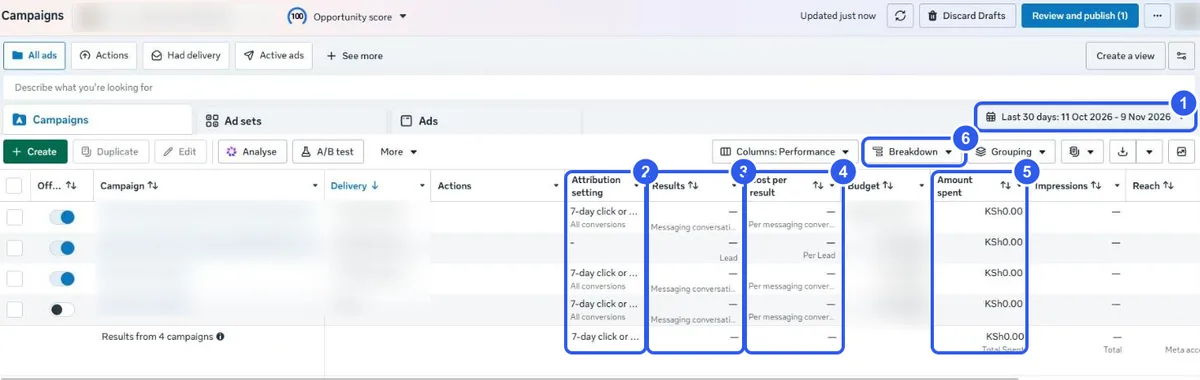
Meta Ads Manager: the five columns to read first
These are Meta’s own definitions, from its Business Help Centre:
| Column | What it means | What to ask |
|---|---|---|
| Amount spent | What the ads cost in the dates you picked | Is it what I planned? |
| Results | How many times the ad got the outcome the campaign was set for: a message, a visit, a sale | What exactly is a “result” in this campaign? |
| Cost per result | Amount spent divided by results | Is it higher or lower than last month? |
| Reach | How many accounts saw the ad at least once (an estimate) | Is it reaching new people? |
| Frequency | How many times, on average, each of them saw it | Is it climbing week after week? |
The most important question is in the second row. A result is whatever the campaign was set to get. One campaign’s result is a WhatsApp message; another’s is a visit to your website. So a cost per result of KSh 40 and one of KSh 400 can both be fine. They are counting different things.
Meta also notes that results may not match how you are billed. You can pay for people seeing the ad and still count purchases as results.
Frequency: the number that warns you early
Frequency is impressions divided by reach. Meta says it may average 1 to 2 per ad set, or be much higher, depending on budget, audience size and schedule. The warning sign is a pattern: frequency rising while results fall. Meta calls that ad fatigue. The same people have seen the same ad too often, and it is time for a new picture or a new audience.
The Delivery column: “Learning”
A new ad set, or one you have just changed a lot, shows “Learning” in the Delivery column. Meta says ad sets usually leave this phase after about 50 results in the week after the last significant edit. During it, results are less stable and usually cost more. So do not judge a campaign in its first days, and do not keep editing it. If it shows “Learning limited”, it is not getting enough results to finish learning.
Google Ads: the columns that matter
Again, these are Google’s own definitions, from Google Ads Help:
| Column | What it means |
|---|---|
| Impr. | How often your ad was shown |
| Clicks and CTR | How many people clicked, and clicks divided by impressions |
| Avg. CPC | The total cost of your clicks divided by the number of clicks |
| Cost | What you spent in the dates you picked |
| Conversions | Conversions from the actions marked as primary: a form sent, a call, a purchase |
| Cost / conv. | Cost divided by conversions: what each one cost you, on average |
| Conv. rate | Conversions per ad interaction, as a percentage |
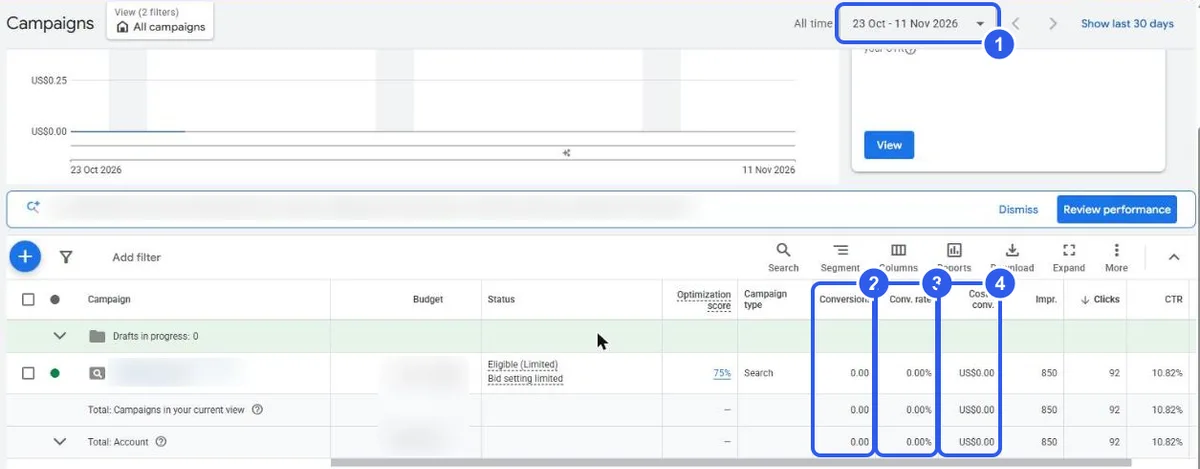
Look at Cost, Conversions and Cost / conv. first. Clicks are only a step on the way; a cheap click that never becomes an enquiry is wasted money. Our guide to what Facebook and Google ads cost in Kenya shows typical click prices and what to measure instead of likes.
Why last week can still go up. Google counts a conversion against the day of the click, not the day it happened. If someone clicked on Monday and called on Thursday, Monday gets the credit. Google says reporting can also lag by up to 24 to 48 hours. Meta counts a result inside an attribution window: by default up to 7 days after a click, or 1 day after a view. Read last week again a few days later before you judge it.
Two more places explain where the money went. The search terms report (Campaigns, then Insights and reports, then Search terms) shows the real searches that triggered your ads. Quality Score, from 1 to 10 per keyword, is described by Google as a diagnostic tool, and “not an input in the ad auction”. Our guide on Google Ads that are not converting explains both, with a 20-minute weekly routine.
Never add the two accounts together
Say Meta shows 30 results this month and Google shows 20 conversions. You did not get 50 customers.
Each platform counts the people its ads reached. One customer can see your Instagram ad on Monday, search your name on Google on Wednesday and click your Google ad. Both accounts may claim them. Meta’s own help also says Ads Manager shows only the actions it links to an ad, while Events Manager shows more of what happens on your site.
So the real total is in your own records: calls, WhatsApp chats, forms, M-Pesa payments. Count them every week. Then compare. If the platforms claim far more than you received, something is being counted twice or counted wrongly; our ad tracking page explains how that gets fixed.
A good week or a worrying week?
Nobody can tell you the “right” cost per result for your business in Kenya. Published figures vary widely, and few have a source. A better test is your own history, at the same budget:
| Good sign | Worrying sign |
|---|---|
| Cost per result steady or falling over four weeks | Cost per result climbing week after week |
| Frequency steady, results steady | Frequency rising while results fall |
| Ad sets out of “Learning” | “Learning limited” for weeks |
| Platform numbers close to your own records | Platforms claiming enquiries you never received |
| Clicks turning into enquiries | Plenty of clicks, almost no enquiries |
That last row can point to the page people land on, not the ad. Our guide on website traffic with no enquiries covers what to check there, and a landing page built for one offer often fixes it.
Then ask one more question: what is an enquiry worth to you? If one customer in five buys, and a sale earns you KSh 5,000, a single enquiry is worth about KSh 1,000 to you. A cost per enquiry well under that is working, whatever the averages say.
Can you see your own accounts?
If someone runs your ads, you should still be able to open both accounts yourself, any day, without asking. Each account should be in your business’s name, with the bill paid from your money. Give the person running them their own access as a user or partner. Never share your password. Our guide on paying for Facebook ads from Kenya shows why the account should be yours from day one, and the same question for Google is answered in who should own your website, domain and Google accounts.
On the Google side, the person who adds users chooses one of five access levels. Here they are in Google’s words, shortened:
| Level | What it allows | Who should have it |
|---|---|---|
| Admin | Everything, including giving and removing access | You, the owner |
| Standard | Edit campaigns and billing details, but not manage users | Whoever runs the ads day to day |
| Read-only | See campaigns and run reports, change nothing | A partner, an accountant, anyone checking the work |
| Billing | See and edit billing and payment methods | Whoever pays the bills |
| Email-only | Receive emails and reports | Anyone who just wants the weekly report |
Meta has its own roles inside Business settings. The rule is the same: the business keeps full control, and everyone else gets only what their job needs.
Your first four weeks with the numbers
Nobody reads an ad account well on the first try. Here is a simple order to follow.
Week 1. Write four numbers down. For each account, set the dates to the last seven days and copy out what you spent, the results or conversions, the cost per result and, on Meta, the frequency. A notebook is fine. Change nothing yet; a campaign still in “Learning” gets worse every time it is edited, and editing in a panic is the most common first-week mistake.
Week 2. Count your own enquiries. Go through the calls, WhatsApp chats, forms and M-Pesa payments for the same seven days and write that number beside the platforms’ numbers. Expect them to differ. You are looking for the size of the gap, not a match.
Week 3. Look behind the totals. Open Google’s search terms and read every search that cost you money. On Meta, check whether frequency has crept up. Then go back to week 1’s figures: they may have grown, because late conversions are credited to the day of the click. Judging a week before it has finished counting is the second mistake almost everyone makes.
Week 4. Make one change. With four weeks written down, you can finally tell a trend from a wobble. Pick the one change your notes point to: a new picture for a tired Meta ad, a few negative keywords on Google, or more budget behind whatever costs least per enquiry. One change, then another four weeks of notes. Changing five things at once means never knowing which one worked.
Where we fit
Reading the numbers yourself is free. Some owners would rather have someone run the ads and send a plain report, or check an account somebody else runs. Our Google and Meta ads page sets out how we work. Send us a screenshot of last month’s columns on WhatsApp, with the amounts hidden if you prefer, if you would like a second opinion.
Sources: read 12 November 2026: Google Ads Help, access levels. Read 11 November 2026: Google Ads Help, conversion tracking data · conversion rate · Quality Score · average CPC · search terms report. Meta Business Help Centre, Results · Cost per result · Frequency · the learning phase · Ads Manager and Events Manager counts. Screens change; check the column names in your own account.
Want this done for you, or checked? Message us on WhatsApp about this guide.
Ask us on WhatsAppQuestions people ask
What is a good cost per result on Facebook ads?
There is no fair single number for Kenya, because a result can be a message, a visit or a sale. Compare your cost per result with your own last four weeks at the same budget, and with what one enquiry is worth to your business.
What does “Results” mean in Facebook Ads Manager?
Meta defines it as the number of times your ad achieved an outcome, based on the objective and settings you chose. If the campaign was set to get messages, a result is a message.
What is frequency in Meta ads?
The average number of times each person saw your ad: impressions divided by reach. If frequency keeps rising while results fall, Meta says your audience may be tired of the ad.
What does “Conversions” mean in Google Ads?
The number of conversions from the actions marked as primary in your account, such as a form or a call. “All conv.” also includes secondary actions and view-through conversions.
Why do my ads numbers change after the week has ended?
Google reports a conversion against the day of the click, and its reporting can lag by up to 24 to 48 hours. Meta also counts a result inside an attribution window, by default up to 7 days after a click.
Does it cost anything to look at my ads accounts?
No. You pay Google and Meta for the ads themselves. Opening your accounts and reading the numbers is free.
Was this guide useful?
Your answer tells us what to write next.
Thank you: that helps.
Tell us what was missing